Job
enquiry:+91-9121642626
Job
enquiry:+91-9121642626
Assembly Language Explained: Syntax, Examples, and Real-World Applications
Assembly language is a low-level programming language that allows developers to communicate directly with a computer's hardware using symbolic instructions. Although modern applications are typically built with high-level programming languages, assembly language remains essential for understanding how processors execute instructions, optimize performance, and manage system resources.
In this guide, you'll learn what assembly language is, how it works, its syntax and core components, common instructions, real-world applications, advantages and limitations, and practical code examples. Whether you're a student, programmer, or technology enthusiast, this article will help you build a strong foundation in assembly language and understand its role in modern computing.
What Is Assembly Language?
The assembly language is a type of programming language that is made for computer processors. It is different from languages like Python, Java or C++ which use words and do not show the complicated details of the computer hardware. The assembly language is very specific. Is closely related to the physical parts of the computers Central Processing Unit.
When people write code in assembly language they do not write strings of binary numbers. Instead they use codes called mnemonics. For example if they want to add numbers they use a code like ADD of writing a long binary sequence. Each type of processor is unique. It has its own assembly language. The assembly language is special for each type of processor architecture, which means that the assembly language for one processor is different from the assembly language, for another processor.
How Assembly Language Works
A computer processor is not able to run assembly language on its own. It needs to be changed into something the processor can understand. This is done by a program called an assembler.
The computer processor and the assembler work together like this:
- Source Code: The person writing the code uses assembly language to tell the computer what to do. They use things like MOV and ADD and SUB.
- Assembler: The assembler looks at the code and changes it into machine code that the computer processor can run.
- Object Code: The assembler makes a file, with the machine code in it. This file can be run by the computer.
- Execution: The computer processor reads the machine code. Does what it says. The processor gets the code from the computer memory. Does the tasks.
The assembly language needs to be changed so the computer processor can run it. The assembler does this job. The computer processor then runs the machine code. The machine code is what the computer processor can understand.
Reference link: How assembly language works
Basic Components of Assembly Language
To read or write assembly code you need to know what the basic parts are. Every assembly language program uses a basic building blocks.
Instructions
An instruction is a command that tells the processor what to do. It says what action the hardware should take.
Registers
Registers are small storage spaces inside the CPU. They are fast. The processor uses them to hold data for a time when it is doing calculations. For example in x86 architectures there are general-purpose registers like AX, BX, CX and DX.
Opcodes
An opcode is the part of the instruction that says what operation to do. We use mnemonics to represent opcodes as text. Some examples are:
- MOV (this means move or copy data)
- ADD (this means addition)
- NT (this means signal)
Operands
An operand is the data or the place where the data is that the opcode will use. An instruction can have no operands, one operand or two operands. For example in the instruction MOV AX 10 the opcode is MOV and AX and 10 are the operands. This instruction tells the processor to copy the number 10 into the register named AX.
Labels and Directives
Labels are like markers in the code. They show places, in the memory or lines of code. This makes it easy to jump to parts of the program using control instructions.
Directives are commands that tell the assembler tool what to do. They help define variables give memory to the program or say how the code should be set up.. They do not turn into machine code instructions that the CPU can use.
Assembly Language Syntax and Structure
Assembly language is really strict about how it's written. It goes line by line. Each line is usually one instruction. This line is normally split into four parts.
These parts are the label, the opcode, the operands and the comments.
- The label part is not always needed. We use it to mark instructions that we will need to jump to or loop over.
- The opcode part is always needed. This is where we put the command like MOV or CMP.
- The operand part is different for each instruction. This tells us where the data is coming from and where it is going to.
- The comment part is not always needed. We start it with a semicolon. It is where we can write notes that the assembler tool will ignore.
Assembly language follows this format:
$$\text{[Label]} \quad \text{[Opcode]} \quad \text{[Operands]} \quad \text{[;Comments]}$$
I like to think of Assembly language as a way to give the computer simple and clear instructions, one line at a time. The Assembly language is made up of these lines each, with its label, opcode, operands and comments.
Assembly Language Examples
To understand how these parts work in life here is an example of a simple 8086 assembly program. This program displays a text message, on the computer screen.
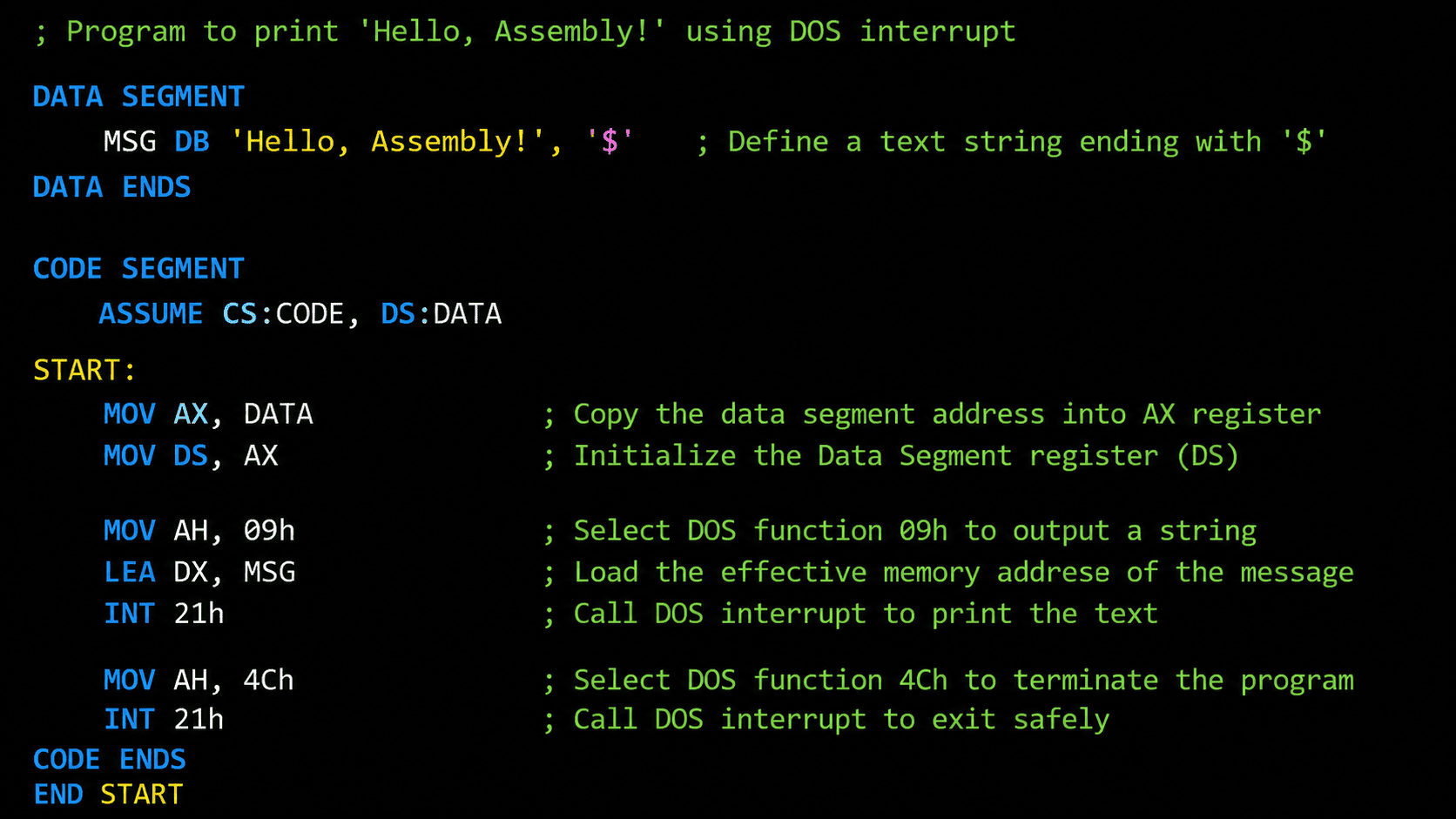
Breakdown of the Example:
These parts help keep the program organized.One part stores data and the other part has the code.
- DB (Define Byte) is, for setting aside space to store characters.It is used for text strings.
- LEA DX, MSG loads the address of the text.It tells the processor where the text starts.
- INT 21h is a command.It tells the processor to pause and let the operating system handle something.
For example it can display text. Exit the program.
Common Assembly Language Instructions
While different processors use different instructions, certain fundamental types of instructions exist across almost all assembly languages:
| Instruction Category |
Example Mnemonics |
Purpose |
|---|---|---|
| Data Transfer |
MOV, PUSH, POP | Copies data from one location (register, memory, or constant) to another. |
| Arithmetic |
ADD, SUB, MUL, DIV | Performs basic mathematical operations on numeric values. |
| Logical |
AND, OR, XOR, NOT | Executes bitwise logical calculations on binary data patterns. |
| Control Flow |
JMP, JE, JNE, CMP | Changes the execution path by jumping to another part of the program, often based on a comparison. |
| Input / Output |
IN, OUT, INT | Communicates with external hardware devices or triggers operating system interrupts. |
Assembly Language vs Machine Language
People get mixed up about assembly language and machine language. They are related. They are not the same thing.
Machine language is made up of binary digits, which are ones and zeros. The computers brain, which is called the CPU can understand it away without needing any help. It is really hard for people to read or write machine language because it is ones and zeros.
Assembly language is different because it uses words and labels that people can understand. It is, like a map of machine language. It needs a special program to turn it into something the computer can understand. This special program is called an assembler.
Advantages of Assembly Language
Writing programs in assembly language offers unique performance benefits:
High Performance and Speed: Because assembly code maps directly to machine code, it executes incredibly fast with minimal computing overhead.
Direct Hardware Access: It allows programmers to control specific hardware components, memory addresses, and CPU registers directly.
Memory Efficiency: Programs written in assembly language can be optimized to use a very small amount of memory space, making it ideal for devices with severe hardware restrictions.
Limitations of Assembly Language
Assembly language has some points but it is not often used for making regular software because it has some big problems.
- It is not portable: This means that if you write assembly code for one type of processor like an Intel x86 chip it will not work on a type of processor like an ARM chip. You have to write the program again from the start for the new hardware.
- It is very complicated: Even a simple function needs a lot of lines of code which makes it take a time to develop and it can be very frustrating.
- It is hard to find mistakes: When you are working with assembly language finding errors or dealing with memory issues is time consuming because you have to look at the raw changes in the registers, which is much harder, than working with high level software languages. Assembly language is just not as easy to use as languages.
Applications of Assembly Language
Assembly language plays a critical role in low-level system programming and the overall Software Development Process
Operating Systems: Core parts of operating systems, such as bootloaders and hardware device drivers, require assembly language to initialize computer hardware directly.
Embedded Systems: Small electronic devices often use assembly language to optimize performance under tight memory constraints. Learn more about Embedded Systems Development.
Real-Time Systems: Systems that require instant, predictable processing speeds (such as flight control software or industrial robotics control systems) use assembly language to prevent delays caused by high-level software translations.
Popular Types of Assembly Language
These assembly languages are grouped based on the kind of processor they are made for.
- The x86 Assembly Language is used a lot for computers and laptops that have Intel or AMD processors.
- The x64 Assembly Language is like an extension of the x86 kind. It is used in almost all new computers people buy.
- The ARM Assembly Language is really popular in things like mobile phones and tablets because it does not use a lot of power.
- The RISC-V Assembly Language is a kind of assembly language that people are using more and more for research and, for making custom hardware and it is open for anyone to use.
Conclusion
Understanding assembly language can help developers become better software engineers and build more efficient Custom Software Development solutions.Assembly language is really important because it connects what people think and how computers actually work. Even though people mostly use high-level languages to make software learning assembly language helps you understand how computers follow instructions use memory and work with the parts that make them run. Assembly language is, like the basics of how computers work. It is good to know about it.
Frequently Asked Questions (FAQ's)
1: Is assembly language difficult for beginners to learn?
Yes this thing is really tough to learn at first. People who are just starting out need to understand what is, inside the Central Processing Unit, the registers and how the memory works, which is all done automatically in languages that are easy to use. The Central Processing Unit is a part of this so beginners need to know about the Central Processing Unit and how it works with the registers and memory.
2: Is assembly language still used today?
Yes. This thing is really used to make device drivers and operating system kernels. It is also used for real-time control systems and low-level firmware for embedded hardware devices. People use it to develop these things because it's very good, at it. The device drivers and operating system kernels that are made with it are very important.
3: What is the difference between an assembler and a compiler?
The assembler takes assembly instructions and turns them into binary machine code that the computer can understand.When we talk about the compiler it does a different job. The compiler takes languages and converts them into machine code.The compiler also changes the way the code is structured so that the computer can run it fast, as possible. The compiler and the assembler both work with machine code. They start with very different kinds of code. The assembler starts with assembly instructions and the compiler starts with complex languages.
4: Can assembly language run on any operating system?
Assembly language depends on the hardware processor. It is different for each processor type.However when programs make operating system calls they must match that operating systems interfaces.This means assembly language code is not portable across operating systems even if they run on the same processor type.The operating system calls are specific, to that system.Assembly language programmers must know the processor architecture and the operating system interfaces.
5: Why don't we write all software programs in assembly language?
Writing software in assembly language is really slow. It is very hard to fix. The code that you write in assembly language only works on one type of computer processor. This makes assembly language inefficient for applications that people use today. Assembly language is not good, for large-scale applications because of this.
Useful Links:
https://en.wikipedia.org/wiki/Assembly_language - ( Assembly language guide)
https://www.lenovo.com/in/en/glossary/assembly-language/ -( some popular assembly languages)
https://www.tutorialspoint.com/assembly_programming/index.htm -( Assembly programming tutorials)
https://www.udemy.com/course/assembly/ -( assembly programming certification course)

.jpg)


.jpg)





 Whatsapp
 Email
Email