Job
enquiry:+91-9121642626
Job
enquiry:+91-9121642626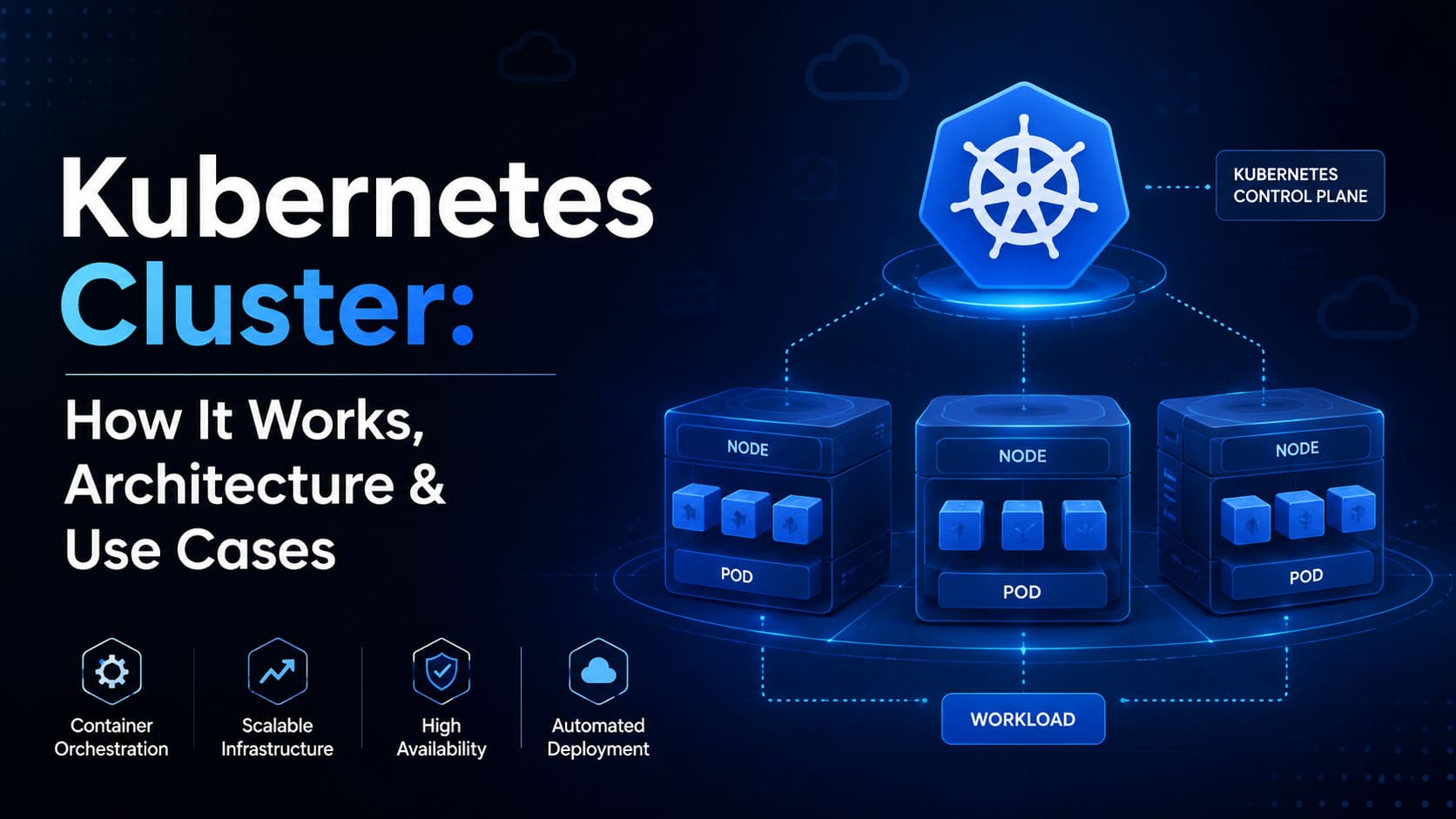
Kubernetes Cluster Explained: Architecture, Components & Best Practices
A Kubernetes cluster is much more than a buzzword or marketing term, this is the actual infrastructure technology that enables Spotify, Airbnb, thousands of smaller companies and startups to run containerized apps reliably at scale, without having to manually configure and manage every server one by one. This guide explains what a Kubernetes cluster is, how it works internally, its architecture and components, how to build a cluster, and best practices for maintaining a reliable production cluster.
Whether you're a developer looking to understand what the infrastructure team is talking about, or an engineer preparing to launch your first cluster, this article is crafted to answer the real questions people search for simply and precisely.
What Is a Kubernetes Cluster?
As can be seen from the name, the Kubernetes cluster is a set of computers (nodes). But unlike bare metal, in Kubernetes, the application does not run on one node. The Kubernetes cluster distributes and schedules the workload among multiple nodes and manages its lifecycle, scales it, and does the automatic failover in case of failures.
There are two main components that form any Kubernetes cluster control plane and worker nodes. The former is responsible for managing the operation of the cluster (scheduling, scaling, health checking).
In analogy to the shipping company, the control plane acts like dispatching and logistics center, deciding what to do, while the worker nodes are the trucks that deliver the goods.
The idea behind a Kubernetes cluster isn't just to run containerized applications this functionality can be provided by Docker alone. The goal is to run containerized applications reliably at scale, with self-healing, automated deployment and efficient resource utilization.
How Does a Kubernetes Cluster Work?
Fundamentally, the Kubernetes cluster works on the declarative principle: you don't tell the cluster how to do something you declare the desired state and let the cluster figure out how to achieve and maintain it.
In detail, here's how it works: a user submits a configuration (in Kubernetes, this is usually a YAML file) to the cluster's API server. Then, the scheduler analyzes the worker nodes, their resource allocation and decides where the container (inside a Kubernetes object called Pod) will run. The kubelet component on each node receives the instruction and launches the container. After that, the cluster continuously monitors the current state, comparing it to the desired one and adjusting the state as needed: if a Pod fails, it's restarted, if the node fails its workloads are rescheduled on other nodes.
It's the endless process of comparing actual state with the desired one that makes a Kubernetes cluster "self-healing": you don't manually restart failed containers at 2 a.m., this is done automatically based on the rules that were defined.
Kubernetes Cluster Architecture Explained
The Kubernetes cluster architecture is organized in two main logical layers: control plane and data plane (also known as worker nodes).
Control plane — the brain of the cluster. This is where components responsible for controlling the cluster's state, scheduling workloads and exposing the API live. In production setup, the control plane is usually run on multiple nodes for higher availability, so that the failure of any single control plane component won't disrupt the whole cluster management system.
Worker nodes — where the actual computation takes place. Every node runs an agent (kubelet), which communicates with the control plane, a container runtime (actually launching containers), and components providing network capabilities.
Between these two layers sits etcd ,the distributed key-value database containing the complete state of the cluster: all configurations, status of all Pods, etc. Failure or corruption of etcd results in loss of memory for the cluster, which is why regular backups are one of the most important and commonly ignored operations in Kubernetes.
Kubernetes Cluster Components: Overview
Control Plane Components
The control plane is composed of several cooperating processes:
- kube-apiserver — the entry point for the cluster. Every operation performed with kubectl or other tools passes through this API server.
- etcd — the source of truth for the whole cluster, containing all configuration and state data.
- kube-scheduler — decides which node will run the new Pod based on the resource availability and constraints.
- kube-controller-manager — runs controllers that check the current state of the cluster and perform actions based on it, for example replacing failed Pods or managing node status.
- cloud-controller-manager — manages integration with the cloud-provider-specific infrastructure like load balancers or storage volumes if the cluster is running on AWS, Azure or GCP.
Worker Node Components
Each worker node runs its own set of processes that are responsible for executing workloads:
- kubelet — an agent communicating with the control plane and ensuring that the containers run on the node as expected.
- kube-proxy — manages the networking rules, allowing communication between Pods and with other services.
- Container runtime — the software (containerd or CRI-O) responsible for pulling and running containers.
Kubernetes Objects
Besides the control plane components, Kubernetes has a set of objects which are used to describe and manage applications:
- Pods — smallest deployable unit, normally containing one or more containers.
- Deployments — manage Pod replicas and rolling updates.
- Services — provide networking for the Pods which otherwise are ephemeral.
- ConfigMaps and Secrets — hold configuration data and sensitive values respectively separate from the application code.
- Namespaces — logically dividing the cluster into several independent environments, useful for separation of teams and environments like staging and production.
Types of Kubernetes Clusters
There's no one-size-fits-all cluster type: broadly speaking, there are several:
- Public cloud-managed clusters — like Amazon EKS, Google GKE and Azure AKS, where the control plane is managed for you, while you're responsible for managing worker nodes and workloads. This is the most popular approach for production teams who don't wish to manage the control plane infrastructure themselves.
- Self-managed clusters — configured using tools like kubeadm, where you're responsible for both the control plane and worker nodes. Provides maximum control and flexibility.
- Local development clusters — like Minikube, Kind and k3d, used for local development and testing without any infrastructure provisioning.
- Edge and hybrid clusters — increasingly popular for IoT and distributed applications, using lightweight distributions like K3s running on smaller hardware, possibly in multiple locations, connected back to the centralized control plane.
Kubernetes Cluster Setup: Step-by-Step Guide
Building a minimal Kubernetes cluster typically follows the next steps:
- Select your environment — decide whether you need a managed cloud service (EKS, GKE, AKS) or self-managed approach with kubeadm. For learning purposes, Minikube or Kind are the quickest options.
- Provision the machines — in case of self-managed clusters, you'll need at least one control plane node and one or more worker nodes, each with supported OS and container runtime installed.
- Install the container runtime — today, containerd is the most popular choice after deprecation of dockershim for Docker.
- Initialization of the control plane — use the command kubeadm init on your control plane node; as a result, you'll have installed an API server, etcd, a scheduler and a controller manager.
- Networking configuration — install a network interface plugin such as Calico, Flannel or Cilium, which allows communication between pods from different Addition of worker nodes — on each worker node, you need to execute the join command received after running kubeadm init.
- Cluster verification — kubectl get nodes is used to check the status of all nodes.
- Deploy a test workload — apply a simple Deployment and Service configuration and verify that the cluster functions end-to-end.
If you select one of the managed services, most of steps 2 to 6 are done automatically for you, this is exactly the reason for their popularity in production.
Kubernetes Cluster Deployment Best Practices
Deployment of the application onto the cluster is different from simply configuring the cluster. Here are several practices that always differentiate successful deployments from chaotic ones:
- Use Deployments instead of single Pods — let Kubernetes manage replication and rolling updates for you.
- Set resource requests and limits for each container — prevent one workload from starving others of resources.
- Use readiness and liveness probes — tell Kubernetes when the container is ready to serve traffic instead of simply being alive.
- Store your configuration in version control, using Helm charts or Kustomize, not applying YAML manually.
- Roll out changes gradually using rolling updates or canary deployments.
- Kubernetes Cluster Networking: What You Need to Know
Network in Kubernetes can be quite confusing due to operating on several layers at once. Every Pod gets its own IP and pods can communicate with each other across nodes without NAT, with help of CNI plugin taking care of the actual network fabric.
Services provide a stable way of accessing groups of Pods, as Pods themselves are temporary and get new IPs as they are recreated. ClusterIP is a way to make the app available only inside the cluster, NodePort makes the app available through specific port on all nodes and LoadBalancer connects the service to your cloud provider, making the app available outside the cluster.
Ingress controllers are an additional layer of Services, doing all the HTTP/HTTPS routing, TLS offloading and providing path-based routing rules to make it possible to expose several services under one external IP with correct domain routing. If you need more sophisticated network and security features, then you can use service mesh solutions such as Istio or Linkerd for the encrypted traffic between services and more granular traffic control and monitoring.
Kubernetes Cluster Security Best Practices
The security in the Kubernetes cluster has several layers and omission of any one of them leaves a security hole:
- Use Role-Based Access Control (RBAC) to limit permissions of the users and service accounts avoid giving cluster-admin permissions whenever possible.
- Implement network policies restricting Pod-to-Pod communication, minimizing potential damage in case of workload compromise.
- Proper secrets management — don't store credentials in plaintext in ConfigMaps or environment variables, use Kubernetes Secrets along with the secrets manager.
- Image scanning — scan container images for vulnerabilities before deploying, not afterwards.
- Keep the cluster updated — Kubernetes gets security patches periodically, so running an outdated version is one of the most common preventable breach vectors.
- Apply pod security standard and restrict privileged containers, host access, and root execution unless absolutely required.
Kubernetes Cluster Monitoring and Logging
You cannot manage what you cannot see and Kubernetes clusters produce massive amounts of operational data. Good monitoring configuration typically consists of:
- Metrics collection — using Prometheus to collect performance metrics from the cluster, nodes and workloads.
- Visualization — using Grafana dashboards to provide real-time metrics for CPU, memory, network and application-specific data.
- Centralized logging — using Elasticsearch, Logstash and Kibana (ELK stack) or Loki for container logs, as they are lost when Pod is terminated or rescheduled.
- Alerting rules — notifying the team about any small issues, like increased memory usage, before it turns into an outage.
- Distributed tracing — using Jaeger when applications consist of multiple microservices and you need to track requests across services.
Kubernetes Cluster Scaling: Types and Techniques
Scaling in Kubernetes happens at several levels and knowing the difference is important:
- Horizontal Pod Autoscaling (HPA) adjusts number of Pod replicas based on the CPU or memory utilization or application-specific metrics. This is the most popular method of scaling for traffic spikes.
- Vertical Pod Autoscaling (VPA) adjusts resource requests and limits of the existing Pods instead of their number — useful for workloads which number of replicas is not the primary scaling factor.
- Cluster Autoscaling — adds or removes worker nodes, adding them when current nodes don't have enough capacity to schedule pending Pods. This is the ability to automatically increase the size of the cluster to deal with increased demand and decrease back to save costs after it.
Combination of all three techniques is what allows clusters to cope with the unpredictable traffic without wasting resources or falling during peak loads.
Kubernetes Cluster Management Best Practices
Maintaining the cluster over time requires constant discipline, not just the good initial configuration:
- Regularly backup etcd as it contains the entire state of the cluster.
- Use namespaces to separate environments and teams, limiting resource consumption and access.
- Apply resource quotas per namespace preventing a single team or application from consuming all cluster resources.
- Automate the cluster upgrades and test them in staging environment before upgrading production.
- Use GitOps tools like ArgoCD or Flux, so the state of the cluster could be traced back to the version-controlled source.
- Regularly audit RBAC permissions and remove unused service accounts and stale permissions.
Benefits of Using a Kubernetes Cluster
Why people choose Kubernetes clusters aside from just following the trend?
- Self-healing — automatically recovering failed containers and nodes without requiring manual intervention.
- Efficient resource usage — scheduling workloads on nodes based on actual resource needs, eliminating the wasteful over-allocation.
- Portability — the same configuration of the cluster could be run on-premises, in the cloud or across multiple cloud providers.
- Quicker deployments — rolling updates and rollbacks reduce risks of breaking anything on updates.
- Built-in scaling — applications can scale up or down based on real demand, not fixed capacity planning.
Common Kubernetes Cluster Challenges and Solutions
Kubernetes is a powerful tool but not a free one: some common challenges and how to overcome them:
- Complexity — Kubernetes has a steep learning curve. Solution: start with managed services and invest in proper training before attempting to deploy self-managed clusters.
- Networking confusion — layers of Services, Ingress and CNI plugins confuse the newcomer. Solution: understand the responsibility of each layer.
- Resource misconfiguration — lack of resource limits leads to noisy-neighbor problem and Pod eviction. Solution: always set requests and limits on every workload from the beginning.
- Cost overruns — uncontrolled autoscaling and resource requests lead to unnecessary costs. Solution: monitor costs along with performance, not separately.
- Security gaps — default configurations are rarely production-ready. Solution: make RBAC, network policies and secrets management mandatory setup steps.
Real-World Kubernetes Cluster Use Cases
Kubernetes clusters are applied in many real-world cases:
- E-commerce sites use Kubernetes to deal with traffic surges during sales campaigns, scaling Pod replicas up and down automatically.
- Financial services deploy Kubernetes for microservices architectures with strict isolation and auditability with namespaces and RBAC.
- Media and streaming companies use Kubernetes to manage unpredictable spiky demand for video encoding and content delivery.
- SaaS companies use multi-tenant clusters, separating customers through namespaces and network policies, while sharing the same underlying infrastructure.
- Machine Learning teams use Kubernetes to orchestrate ML jobs and serve trained models, often combined with GPU-aware scheduling.
Kubernetes Cluster vs Docker Swarm
Both Docker Swarm and Kubernetes are used to orchestrate containers but in very different manners. Swarm is simpler to set up and to learn, making it reasonable choice for small teams or applications. Kubernetes, on the other hand, provides much finer-grained control over networking, scaling, security and scheduling at the expense of complexity.
In practice, however, Swarm has become obsolete for production use due to its poor ecosystem and community development — most monitoring solutions, cloud providers and CI/CD pipelines are built with Kubernetes in mind, so it becomes a more future-proof choice even for small deployments.
Kubernetes Cluster on Major Cloud Platforms
All major cloud providers offer their own managed Kubernetes services where they take care of the control plane, allowing the team to focus on workloads:
- Amazon EKS has deep integration with AWS services like IAM, VPC and Elastic Load Balancer, making it the perfect choice for teams working with AWS.
- Google GKE is generally considered the most mature managed option as Google was initially the author of Kubernetes, and has additional features like Autopilot providing completely hands-off node management.
- Azure AKS is integrated deeply with Azure Active Directory and other Microsoft enterprise tools and is popular in organizations running on Azure.
The core Kubernetes experience is quite similar in all three — the difference is mostly in the degree of integration with the provider-specific identity, networking and billing tools.
Best Practices for Building High-Performing Kubernetes Cluster
Several common practices that always distinguish high-performing clusters from low-performing ones:
- Right-size nodes instead of allocating larger nodes that will be idle the most of the time.
- Use node affinity and taints/tolerations to allocate workloads on the appropriate specialized hardware, like GPU nodes for ML workloads.
- Allocate etcd on fast dedicated storage as the performance of etcd impacts cluster responsiveness.
- Regularly review and tune HPA thresholds based on actual traffic patterns.
- Minimize the number of sidecar containers as every one of them introduces overhead in every Pod.
Conclusion
Kubernetes cluster is more than the infrastructure it's an operating paradigm for running the applications that require reliability, scalability and self-healing without manual effort. Understanding the architecture from the control plane down to the individual Pods makes it much easier to deploy, run and troubleshoot the real-world systems.
Whether you're building your first cluster with Minikube or managing fleets of workloads on EKS or GKE, the fundamentals remain the same: configure the architecture correctly, secure it properly, monitor and scale it intentionally. If you do so, Kubernetes becomes much less of the hard to manage system and much more reliable foundation for applications.
Frequently Asked Questions
What is a Kubernetes cluster in simple terms?
It's a combination of machines that work together to run and manage containerized applications automatically, scaling, failing over and updating them without manual intervention.
How many nodes does a Kubernetes cluster need?
There is no fixed number, but typical production clusters have at least 3 control plane nodes for availability and several worker nodes to distribute the workloads and manage failover.
Can I run Kubernetes on a single machine?
Yes, you can do that with tools like Minikube or Kind, which are designed for local development and testing and not intended for production.
Is Kubernetes only for large companies?
No, managed services like GKE, EKS and AKS have made Kubernetes available even for small teams, though it's worth considering whether simpler solution would suffice for very small projects.
What's the difference between Pod and container?
Container is a single running instance of an application, while Pod is the Kubernetes object that wraps one or several containers, sharing storage and network.









 Whatsapp
 Email
Email