Job
enquiry:+91-9121642626
Job
enquiry:+91-9121642626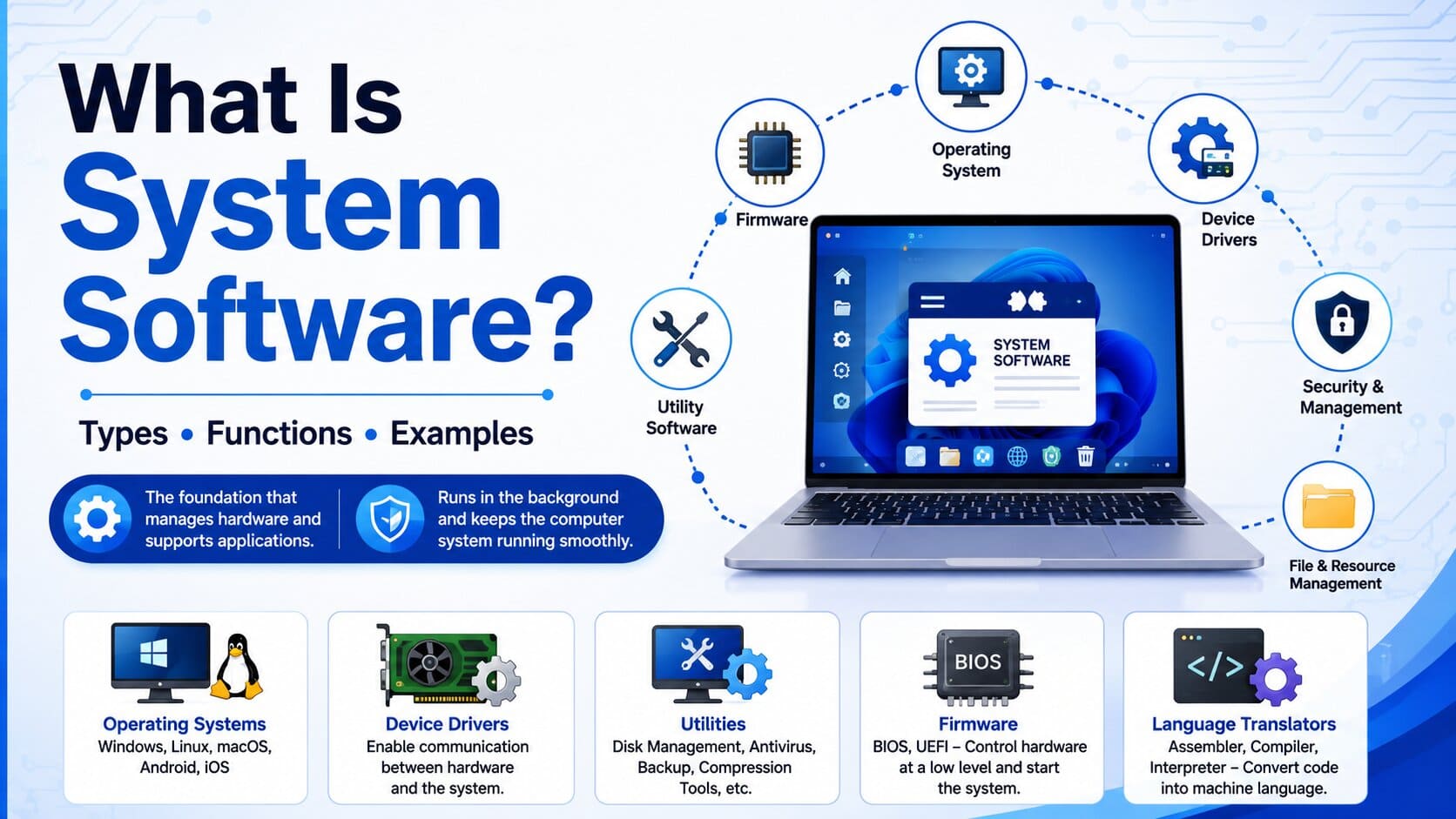
System Software: The Foundation of Computer Operations
Every time you press the power button on your laptop, something invisible springs into action before your desktop appears. Layers of code check hardware, allocate memory, fire up drivers most users never think about it. I see people confuse system software with the apps they use daily. They are not the same. System software is the scaffolding everything computing is built on. Without it, nothing runs.
What Is System Software?
System Software consists of programs which are designed to operate and control the operations of various hardware of a computer. System software is actually the interface between different computer hardware components and the computer applications. In simpler words, you can also called system software to the translator which help different applications communicate to different computer components and other installed software application. It takes that raw power and makes it usable. Every computing experience starts here.
Why System Software Is Important
Here's the truth most tech articles skip: without system software, modern computing doesn't exist. Your word processor has no idea how to talk to your hard drive. Your browser can't request memory from the CPU. Every application you use relies on system software to handle those conversations between hardware and code. It abstracts hardware complexity, creates a stable runtime environment, and does all of that invisibly.
How System Software Works
Interaction Between Hardware and Software
The relationship between hardware and software is not direct it goes through layers. When you click save, the application passes that instruction to the operating system. The OS talks to the file system. The file system talks to the storage driver. The driver sends the actual command to your hard drive. System software manages every single step in that chain. It translates high-level instructions into machine commands hardware understands.
Managing System Resources
Resources are finite. The amount of RAM in your computer isn’t infinite. The processor is made of a number of cores. Storage is limited. It’s up to your OS to determine which piece of code needs which piece of computing resources and when and for how long. When you have a browser, a video call, a music app, and three documents open simultaneously, something has to coordinate CPU allocation across all of them. That's system software constant scheduling, prioritizing critical tasks, reclaiming idle memory every millisecond.
Key Functions of System Software
Memory Management
System software tracks which portions of RAM are in use and which are free. It uses paging dividing memory into fixed blocks and virtual memory, which uses hard drive space as overflow RAM. When you open an application, memory gets allocated. When you close it, memory releases back to the pool. When that process breaks down, you get crashes and freezes. Most people blame hardware. It is usually this.
Process Management
Every running program is a process. System software is the traffic controller for all of them creating processes, scheduling CPU time, and terminating tasks when they complete or crash. Modern operating systems use sophisticated scheduling algorithms to keep everything moving without any single process hogging the CPU. When an
application freezes and you force-quit it, you're invoking process management. It finds the stuck process and ends it.
File Management
Your files don't store themselves. File management handles organizing data on storage devices, maintaining directory structures, and enforcing access permissions. Different operating systems use different file systems NTFS for Windows, APFS for macOS, ext4 for Linux but all serve the same purpose: making persistent data storage logical and accessible without requiring users to understand what's happening physically on the drive.
Device Management
Plug in a keyboard. Attach an external drive. Connect a Bluetooth speaker. Something has to figure out what appeared and how to communicate with it. System software maintains device drivers small programs that translate generic OS commands into the specific language each hardware device understands. Device management also handles conflicts, preventing two components from claiming the same system resource simultaneously. Without it, every hardware connection would almost certainly fail.
Security and Performance Monitoring
System software watches everything: CPU usage, memory consumption, disk activity, network traffic. That monitoring serves two purposes catching security threats and maintaining performance. It enforces access controls, manages user permissions, and integrates with hardware security features like TPM chips. On the performance side, it identifies bottlenecks and makes real-time adjustments. When your system slows under heavy load, system software is the one trying to balance competing demands with whatever's available.
Types of System Software
Operating Systems
The operating system is the cornerstone the largest, most complex, and most visible type of system software. An OS manages all hardware resources, provides a user interface, and creates the environment for all other software to run. Major examples include Windows, macOS, Linux, Android, and iOS. The OS is what boots when you power on your device. It's the first significant software that loads and the last to shut down.
Device Drivers
Device drivers are specialized programs that enable the operating system to communicate with specific hardware. Every component graphics cards, network adapters, printers, USB controllers needs a driver that speaks its language. Without the correct driver, hardware doesn't function. This is why installing new hardware sometimes requires downloading updated drivers, and why outdated drivers cause system instability. The driver is the translator between generic OS commands and hardware-specific instructions.
Firmware
Firmware is system software embedded directly into hardware stored in ROM or flash memory. BIOS and its modern successor UEFI are the classic examples. They initialize hardware before the OS loads, run the Power-On Self Test, and hand control to the OS bootloader. Firmware also lives in peripherals your router, graphics card, and smart thermostat all run firmware underneath everything else.
Utility Software
Utility software handles maintenance, optimization, and support tasks. It's not central to hardware management like an OS, but fills essential operational gaps. Examples include disk defragmentation tools, backup utilities, antivirus programs, compression software, and system monitors. Some utilities ship with the operating system; others are third-party installs. These are the tools you reach for when something isn't working right, or when you want to extract more performance from existing hardware.
Language Translators
Language translators convert human-readable code into machine-executable instructions. Compilers translate entire programs before execution. Interpreters process code line by line at runtime. Assemblers convert assembly language into machine code. They're system software because they operate at the infrastructure level enabling the creation of everything else. Without language translators, developers would write directly in binary. The entire software ecosystem depends on this translation layer existing and functioning correctly.
System Software vs Application Software
Key Differences
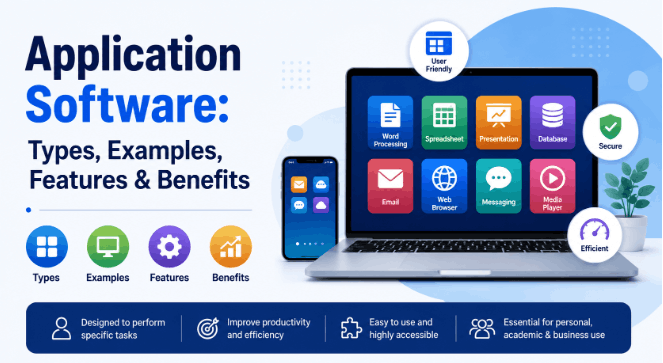
System software and application software exist at fundamentally different levels. System software manages the machine hardware, resources, processes. Application software uses what system software provides to deliver specific functionality to users. System software runs continuously from boot to shutdown. Application software runs when you launch it. System software operates invisibly in the background. Application software is what you actually see and interact with. One maintains the environment. The other uses it.
| Feature | System Software | Application Software |
| Purpose | Manages hardware & resources | Performs user-specific tasks |
| User Interaction | Minimal / background | Direct and visible |
| Examples | Windows, Linux, BIOS, drivers | Chrome, Excel, Photoshop |
| Dependency | Runs independently | Requires system software |
| Startup | Loads at boot | Launched by user |
| Language | Level Low to mid level | High level |
| Customization | Limited to settings | Highly customizable |
Real-World Examples
When you open Spotify, that's application software. But Spotify relies on audio drivers to reach your speakers, the file system to cache songs locally, and the OS network stack to stream from the internet all system software. When you take a phone photo, the camera app is application software. The camera driver, image processing firmware, and storage management are system software handling what actually happens when you press the shutter.
Advantages of System Software
Improved System Performance
System software dramatically improves what hardware can actually do. Raw hardware without software control is inefficient resources sit idle, tasks compete without coordination, throughput suffers. System software introduces scheduling, caching, prefetching, and load balancing that push hardware closer to its theoretical limits. OS-level optimizations like memory compression and adaptive CPU frequency scaling improve perceived performance by meaningful margins without any hardware upgrade.
Efficient Hardware Utilization
Sharing hardware between multiple processes is something system software handles elegantly. A single CPU core can appear to run dozens of processes simultaneously through time-slicing. Multiple programs share memory safely through virtualization. Hardware that would otherwise sit idle gets put to work because system software coordinates the sharing. Without it, multitasking as most users understand it would not be possible.
Enhanced User Experience
The smoothness of daily computing is a system software achievement. Fast boot times, responsive multitasking, seamless hardware detection, consistent file speeds these are outcomes of well-designed system software, not hardware alone. When people describe a device as feeling fast, they're often describing system software optimization quality as much as the processor or RAM specifications.
Challenges and Limitations of System Software
Compatibility Issues
Compatibility is the stubborn headache that never fully goes away. New hardware needs new drivers. Old applications break on new OS versions. Organizations running legacy software get stuck on outdated operating systems for years because of dependencies nobody mapped when the original software was written. Those constraints compound older OS means older security posture, reduced performance, and reduced vendor support. Compatibility problems have a way of becoming permanent.
Security Risks
Because system software operates at the deepest privilege level, vulnerabilities in it are extraordinarily dangerous. A flaw in a device driver or kernel can give an attacker complete system control bypassing all application-level security. Kernel exploits, rootkits, firmware attacks these are the most serious threat categories precisely because they hit the layer that runs with the highest privileges and is hardest to detect or remove.
Maintenance Requirements
System software requires constant maintenance. Security patches, driver updates, compatibility fixes, performance improvements a modern OS receives thousands of changes per year. Organizations that fall behind accumulate technical debt that becomes a crisis. It's not installed once and forgotten. It requires active, ongoing management. That cost is real, and it's consistently underestimated until something breaks badly.
Future Trends in System Software
AI-Powered System Management
AI integration into system software is already underway. Predictive resource allocation where the OS learns usage patterns and pre-loads likely-needed resources is one application. Anomaly detection for security threats is another. Adaptive performance tuning responding to real-time workload characteristics is growing in enterprise environments. The potential is genuine. Where the boundary sits between useful optimization and complexity that introduces new failure modes is still being worked out.
Cloud-Based Operating Systems
ChromeOS proved that a cloud-first OS model could work at scale. The broader trend toward thin clients devices offloading processing to cloud infrastructure is accelerating. Local system software handles basic hardware management while compute-intensive work runs remotely. This blurs what an operating system even means when the computing environment extends into a data center thousands of miles away.
Enhanced Cybersecurity Features
Security is moving deeper into system software. Hardware-rooted trust security anchored in dedicated silicon rather than software is now standard on modern devices. Secure boot, memory encryption, and hardware-based attestation are shifting from enterprise features to consumer defaults. Future system software will integrate monitoring at even more fundamental levels, using firmware telemetry to detect attacks that bypass traditional software defenses entirely.
Conclusion
System software is the unglamorous backbone of everything computing does. No operating system, no drivers, no firmware and none of the applications anyone cares about can function. It's infrastructure. Invisible when working. Catastrophic when not. For developers, IT professionals, and anyone building on computing infrastructure, understanding system software is foundational. The field is evolving fast. Where it lands in ten years is an open question.
Frequently Asked Questions
What is system software in simple words?
System software is a group of programs that manages your computer's hardware and creates the environment where all other software can run. It includes your operating system, device drivers, and utility programs essentially the invisible layer that keeps your entire computer functioning.
What are the 5 types of system software?
The five main types are operating systems (Windows, Linux, macOS), device drivers (hardware translators), firmware (BIOS/UEFI), utility software (antivirus, disk tools), and language translators (compilers, assemblers). Each type handles a distinct function within the overall system infrastructure.
What is the difference between system software and application software?
System software manages hardware and provides the runtime environment. Application software uses that environment to serve specific user needs. System software runs continuously in the background; application software runs when you launch it. One builds the stage. The other performs on it.
Can a computer work without system software?
Not in any practical sense. Without system software, hardware has no mechanism for managing itself, no way to run applications, and no path for user interaction. A computer without system software is a collection of electronic components with no coordination and no output.
What are examples of system software?
Examples include Microsoft Windows, Linux, macOS, and Android (operating systems), BIOS and UEFI (firmware), graphics and network drivers (device drivers), antivirus and disk management tools (utility software), and compilers and assemblers (language translators).






 Whatsapp
 Email
Email